



Send Email Using Subjects: sendEmailHandler
The Send Email Using Subjects function sends an email with a defined subject line, message body, and optional attachments using the configured email server settings.
It supports authenticated and secure email connections, making it suitable for enterprise environments. When executed, the function connects to the specified email server and sends the email to the configured recipients based on the provided parameters.
Steps to Configure:
- Add a new step in the Use Case.
- Select SET from the Action dropdown.
- Leave the Screen Name field blank.
- Enter a variable name in the Element Key field to store the execution status (true/false).
- Click Form, select Functions, and choose Send Email Using Subjects from the dropdown.
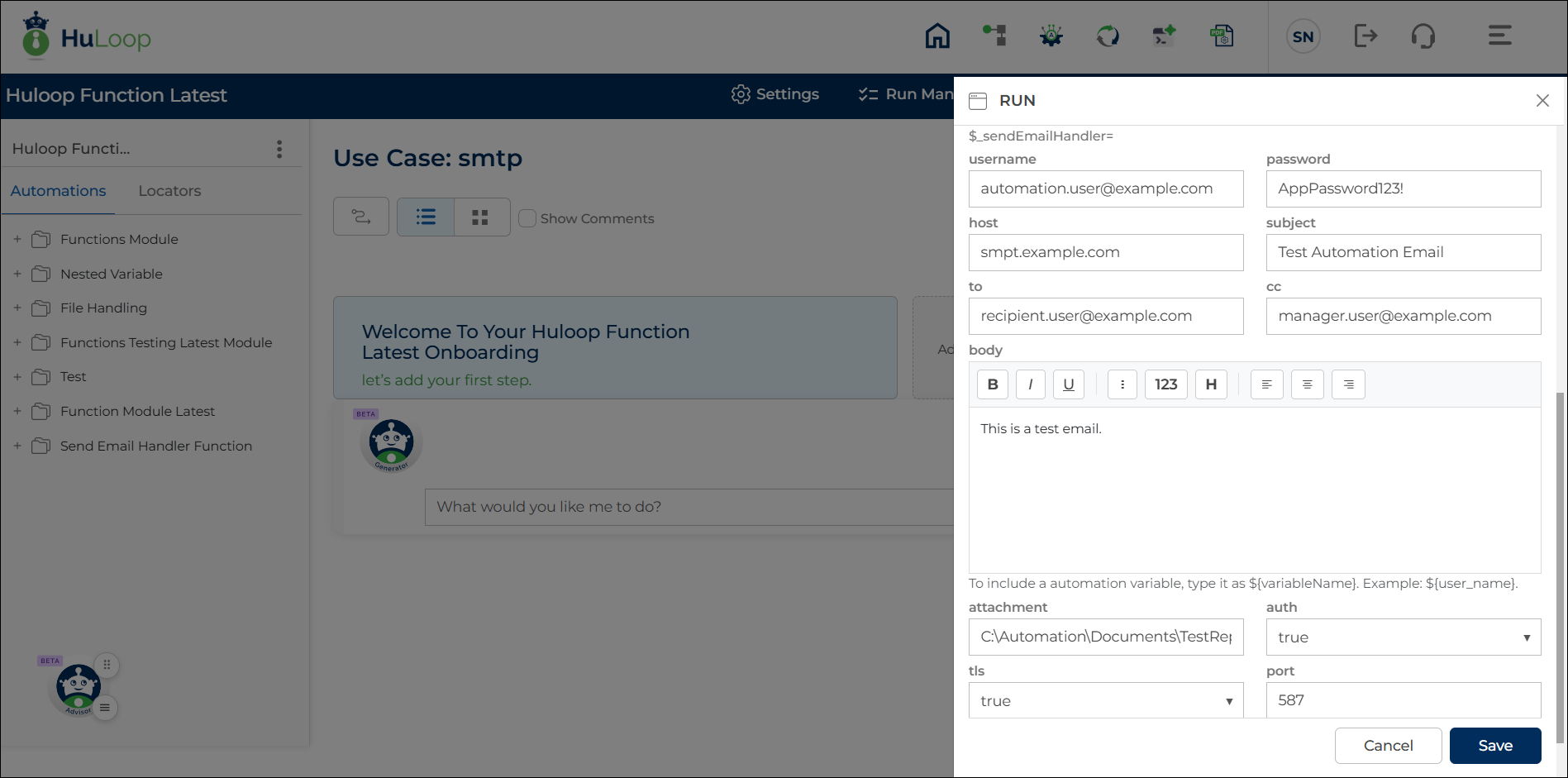
- Provide the required parameters as described below.
- Username: The email account username used to send the email.
- Password: The password or app-specific password for the email account.
- Host: The email server address used to send emails.
- Port: The port number used to connect to the email server.
- Protocols: The protocol used for sending the email (Default is TLSv1.2).
- Auth (True | False): Specifies whether authentication is required to connect to the email server.
– True: Uses the provided username and password for authentication.
– False: Connects without authentication. - TLS (True | False): Specifies whether “mail.smtp.starttls.enable” should be enabled or not.
- Check Server Identity (True | False): Specifies whether the “mail.smtp.ssl.checkserveridentity” should be enabled or not.
- Trust: Specifies trusted server or certificate details used to establish a secure connection. This field is typically used in enterprise or secured environments.
- Subject: The subject line of the email.
- To: The primary recipient email address.
- CC: Optional. Email addresses to include as carbon copy recipients.
- Body: The content of the email message. The Body field includes a built-in email content editor that allows you to create and format email content directly within the platform.
Using the editor, you can:- Enter and format email content without creating external HTML files.
- Apply supported text formatting options directly within the editor.
- Preview the email content while designing the message.
- Create professional email communications more efficiently within the automation designer.
- Attachment: Optional. File path of the document to attach to the email.
- Click Save.
Outcome on Execution:
- On successful execution, the function sends the email to the specified recipients using the configured server and security settings.
- If an Element Key is provided, the execution status is stored in the variable defined in the Element Key field and can be referenced in later steps using the syntax ${VariableName}.
Notes:
- Ensure the email server details and credentials are correct.
- Some email providers may require app-specific passwords.
- Enable Auth, TLS, and Check Server Identity as recommended by your organization’s security policies.
