


Check MICRLine Extraction
The Check MICRLine Extraction function reads the MICR (Magnetic Ink Character Recognition) line printed at the bottom of a bank check. It extracts key financial details such as the routing number, account number, check number, and word amount.
This function is commonly used in check-processing workflows to capture financial information directly from a check image. When executed, the function analyzes the image and returns a JSON output that includes each extracted value along with a confidence score (0 to 1), showing how accurately the text was recognized.
Steps to Configure:
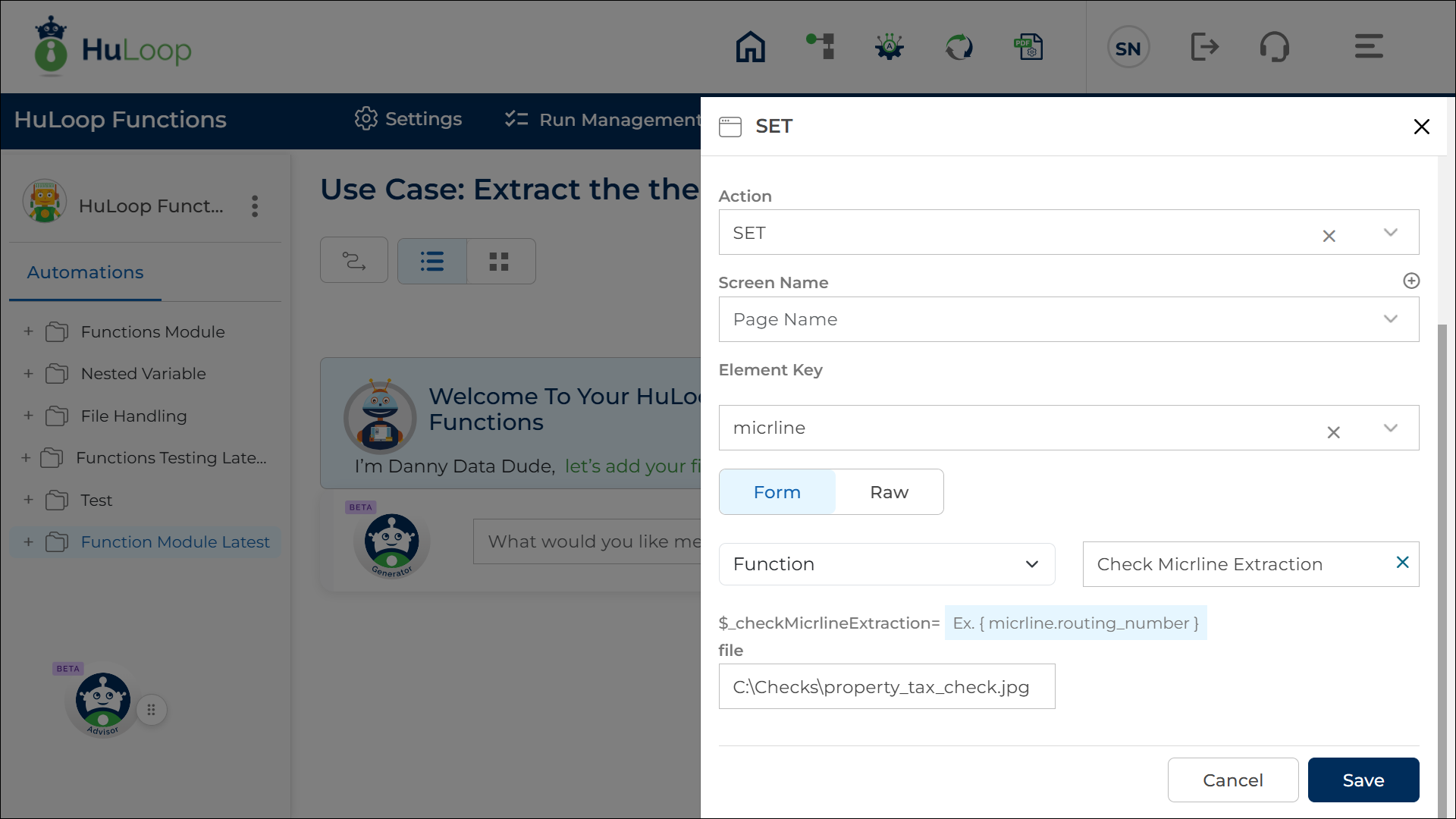
- Add a new step in the Use Case.
- Select SET from the Action dropdown.
- Leave the Screen Name field blank.
- Enter a variable name in the Element Key field that will store the output.
When you select the function for the first time, HuLoop auto-populates the Element Key as micrline. You may change this name if needed. - Click on Form, select Functions, and choose Check MICRLine Extraction from the dropdown.
- Provide the required parameters:
- file: Enter the full file path of the check image you want to process. (Example: C:\Checks\property_tax_check.jpg)
- Click Save.
Outcome on Execution: On successful execution, the function extracts and returns several MICR-related details from the check, including:
- Routing Number
- Account Number
- Check Number
- Word Amount
- Confidence Score (0 to 1 for each extracted value)
- Position (the order of appearance in the MICR line)
- Error Flag (true/false)
The output is returned in JSON format and stored in the variable defined in the Element Key field.
You can reference these values in later steps using curly-brace syntax. For example:
${micrline.routing_number}
${micrline.account_number}
${micrline.check_number}
${micrline.word_amount}
Sample Output:
{
“fname”: “ property_tax_check.jpg”,
“routing_number”: {
“content”: “063000047”,
“confidence”: 0.84,
“position”: 1
},
“account_number”: {
“content”: “898055265222”,
“confidence”: 0.84,
“position”: 2
},
“check_number”: {
“content”: “1922”,
“confidence”: 0.84,
“position”: 3
},
“word_amount”: {
“content”: 1605.48,
“confidence”: 0.26,
“position”: null
},
“error”: false
}
Last updated: Dec 03, 2025