


Get Check Data From Image: CheckDataExtraction
The Get Check Data from Image function allows you to extract key check details from scanned check images.
When this function runs, HuLoop reads the check file and extracts important financial information such as routing number, account number, check number, amount in words, maker name, and payee name. All extracted data is stored in a variable for use in later automation steps.
Supported File Formats
You can use the following file types:
- PDF (scanned)
- JPG
- JPEG
- PNG
Data Extracted
This function extracts the following six data fields:
- Routing Number
- Account Number
- Check Number
- Word Amount
- Maker Name
- Payee Name
Each extracted field includes:
- Content: The actual extracted value
- Confidence: The confidence score of the extraction
- Position: The location of the data in the image
How to Use the Function
Step 1: Add the Action
- Add a new step to your automation.
- In the Action dropdown, select SET.
- From the Function list, select Get Check Data from Image.
When you select the function, a default variable name is automatically added to the Element Key field.
By default, the variable name is: checkData
You can rename this variable if needed.
Step 2: Provide the File Path
In the File field:
- Enter the full file path of the check image you want to process.
Example: C:\Checks\sample_check.pdf
- Click Save
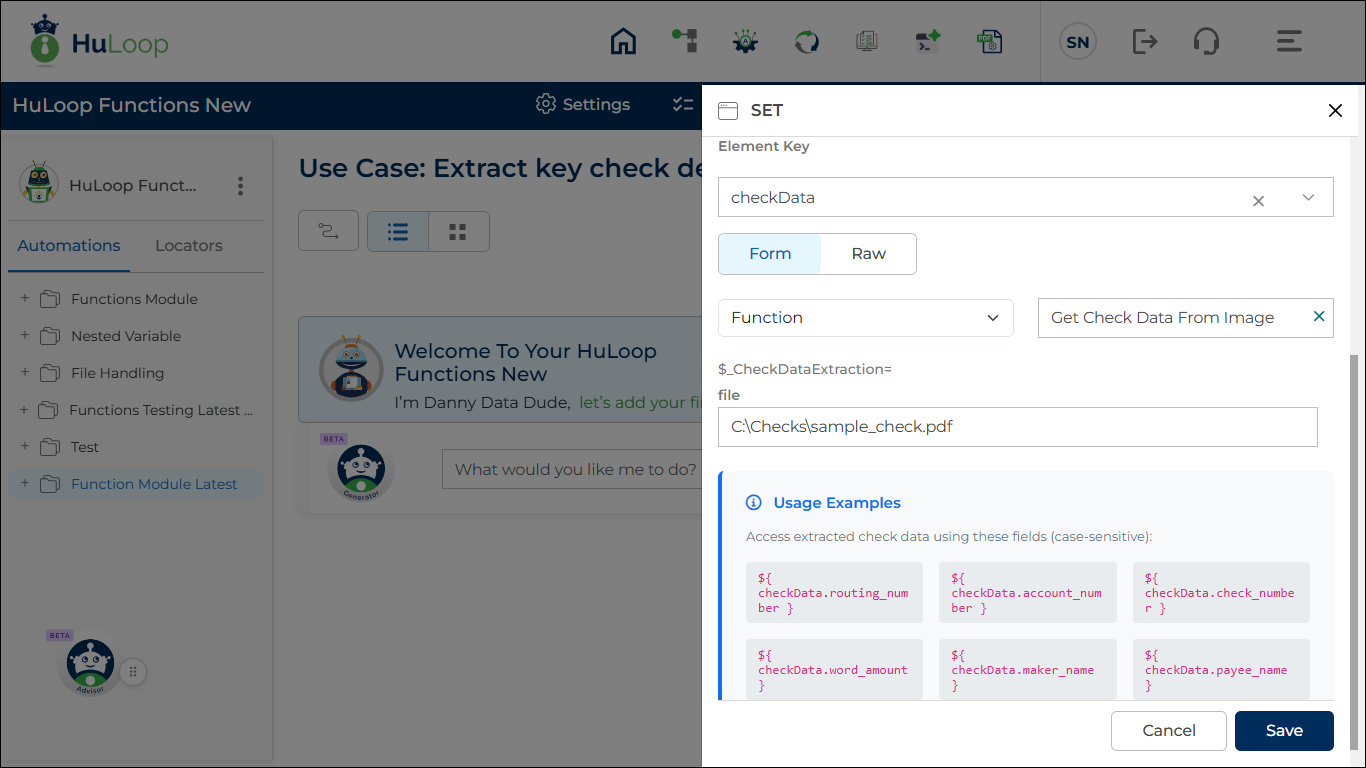
Expected Outcome on Execution:
When the automation runs:
- All six data fields are extracted.
- The results are stored inside the variable defined in the Element Key.
- Each field contains content, confidence, and position properties.
How to Use Extracted Data in Later Steps
If you want to use a specific value in another step, use the following syntax:
${variable_name.field_name}
Examples:
If your Element Key is: checkData
You can reference specific values like this:
- Routing Number: ${checkdata.routing_number}
- Account Number: ${checkdata.account_number}
- Check Number: ${checkdata.check_number}
- Word Amount: ${checkdata.word_amount}
- Maker Name: ${checkdata.maker_name}
- Payee Name: ${checkdata.payee_name}
