


Workflow Designer
The Workflow Designer allows you to build automated processes using a visual, drag-and-drop interface. You can define how a workflow starts, what steps it follows, and how tasks move based on conditions or inputs. The designer includes core building blocks like nodes, connectors, and variables, making it easy to create structured workflows.
Before diving into task creation and permissions, it’s helpful to understand the components that make up a workflow. This section gives you the foundational elements you’ll use throughout the process.
Key Elements of the Workflow Designer
The designer includes the following elements to help you structure your workflow:
- Nodes: Nodes are the building blocks of workflow. The available node types include:
- Start Node: Every workflow begins with a Start node. This is the first and mandatory element in every workflow. It marks the entry point and sets the stage for the steps that follow.
- Task Node: Represents a task that must be completed by an individual or group. You can create and assign a custom form to this node for data collection. Tasks can also include due dates, instructions, and assignment settings.
- IPA Node: The IPA Node allows you to run an automation process as part of a workflow. When the workflow reaches this node during execution, it automatically triggers the selected Intelligent Process Automation (IPA) without requiring manual intervention.
Use an IPA node when you want to:- Reuse existing automation logic within a workflow
- Combine manual tasks and system automation in a single process
The IPA node executes through the HuLoop Windows Agent Scheduler. Once triggered, the workflow waits for the automation to complete and then continues to the next step based on the execution result.
- Decision Node: Allows the workflow to branch based on logic and variable values.
- End Node: Marks the completion of a workflow path.
- Connectors: Arrows that define the logical flow or transitions between nodes.
- Forms: Customizable input forms that are associated with task nodes. Forms allow users to submit required data as part of the workflow.
- Unique Identifier: A value captured at the start of the workflow to help distinguish individual workflow instances.
- Workflow Variables: Data values used to store, pass, and reference information across different steps in the workflow.
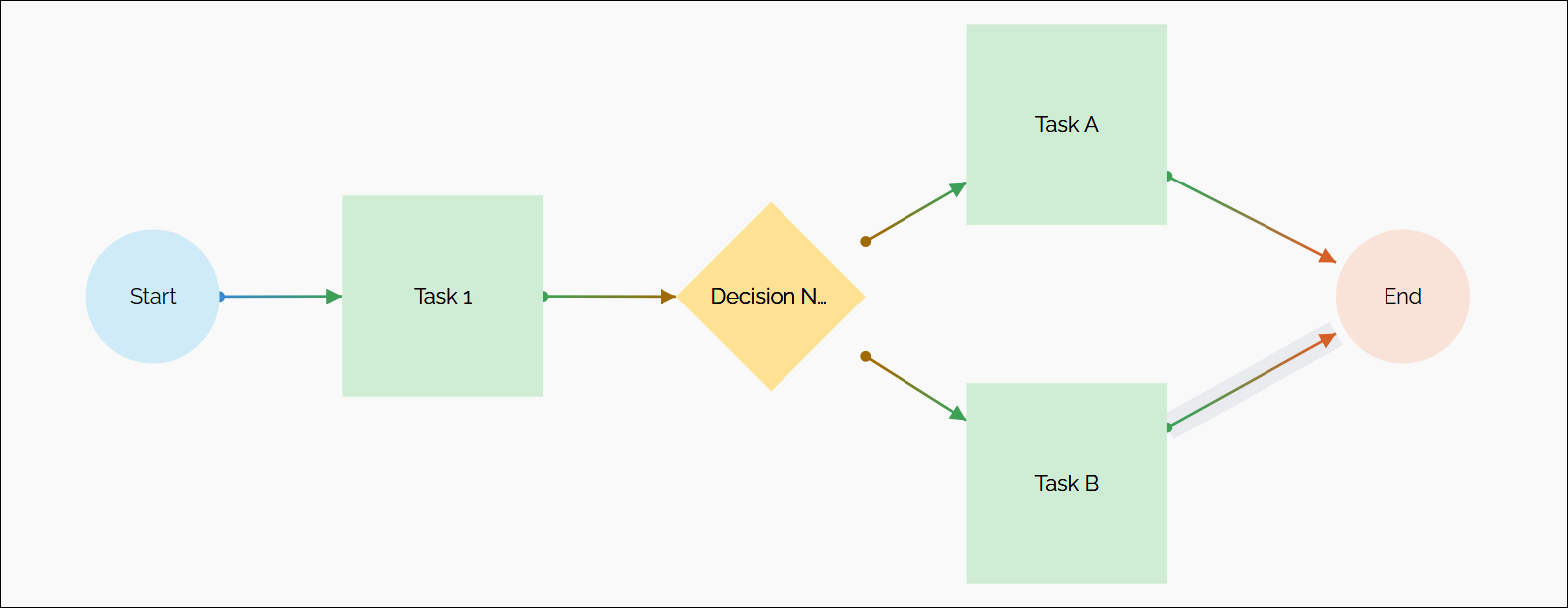
Example Workflow Flow Layout:
- The workflow begins at the Start node, proceeds to Task 1, and then reaches a Decision Node.
- Based on the decision logic, the workflow continues to either Task A or Task B and finally reaches the End node.
